
Incident report form and incident log template: free, with a guide to setting them up
A free incident report form, incident log template and setup guide: what to record, what to report to HSE, and how to set up the form and log yourself. Or have it set up for you: a reporting form built for your sites, every report in your log by itself, the right people alerted, and a dashboard that updates itself, from £399.
Many employers must keep an accident book, and some incidents must go to HSE. Take the free incident report form, incident log template and setup guide, and set them up yourself. Or have it set up for you: your reporting form built for your sites, ready for staff on any phone or computer, every report landing in your log by itself, the right people emailed for each one, and a dashboard that updates itself, from £399 per company.
| Question | Short answer |
|---|---|
| What to record | Who, what, when and where, any injury, witnesses, and what you did about it. |
| Do we need an accident book? | Yes, if you normally employ 10 or more people at the same time on or about the same premises. |
| What goes to HSE? | Deaths, specified injuries, over-seven-day injuries, some diseases and dangerous occurrences, under RIDDOR in Great Britain. |
| Near misses? | Record them too. They show you where the next accident could happen. |
| How long to keep records | At least three years for RIDDOR records and accident book entries. |
What to record on an incident report form
These are the questions on the free incident report form. The person who saw or was involved in the incident fills in the first part as soon as they can:
- Who is reporting. Name, job title and how to contact you.
- When it happened. Date and time.
- Where it happened. Site, building or area.
- What type of incident it was. Someone hurt or made ill, a near miss, a dangerous occurrence, damage, or something else.
- Who was involved. Staff, contractors, visitors or members of the public, by role.
- What happened. The facts, in the order they happened.
- Any injury or ill health. What it was, and any first aid given.
- Witnesses. Names and how to contact them.
- What was done straight away. To make the area safe or help the people involved.
- Who it was reported to, and when. The manager or person responsible.
The manager completes the last part:
- Does it need reporting to HSE? Check against RIDDOR, and record the date reported.
- What happens next Actions, who owns each one, and by when.
How to write an incident report
First give first aid and make the area safe. Then write down the facts while they’re fresh, in the order they happened: what you saw and heard, the people and equipment involved, and the names of the witnesses. Take each witness’s account separately, in their own words, and leave out guesses about who was to blame. HSE’s guidance is to investigate with prevention in mind and to keep blame out of it.
Things to be aware of
Some incidents must go to HSE. In Great Britain, RIDDOR makes the employer, or whoever controls the premises, report work-related deaths, specified injuries to workers, injuries that keep a worker off work or their normal duties for more than seven days in a row, some occupational diseases, certain dangerous occurrences, and members of the public taken straight from the scene to hospital for treatment. Tell HSE about a death, specified injury or dangerous occurrence without delay and report it within 10 days, and report an over-seven-day injury within 15 days. Record injuries that keep someone off for more than three days too, even though you don’t report them, and keep RIDDOR records for at least three years. Northern Ireland has its own version of RIDDOR, with different deadlines.
You may need an accident book. If you normally employ 10 or more people at the same time on or about the same premises, or run a factory, mine or quarry, social security law requires one, on paper or electronically. HSE says you can buy its accident book or record the details in your own system.
Record near misses. A near miss is an event that didn’t cause harm but could have caused injury or ill health. Each one shows you where to act before someone is hurt.
Keep it private. Injury and illness details are health data, which data protection law treats as special category data. Let only the people who need them see them, keep them secure, and keep them no longer than you need to.
Review your risk assessments. After an incident, review the risk assessments it touches. HSE says failing to do so could breach the Management of Health and Safety at Work Regulations 1999.
What you’ll get
Set up the free templates yourself with the guide, or have us set up your incident reporting for you.
| Free templates and guide | Set up for you, from £399 | |
|---|---|---|
| The reporting form | A blank template to adapt yourself | Built for your sites and incident types |
| How staff report | On paper, or an online form you build | From any phone or computer, ready to use |
| Reports into the log | You type or link them yourself | Every report lands in your log by itself |
| Alerts | No automation included | The right people emailed for every new report |
| Seeing patterns | No dashboard included | A dashboard that updates itself |
| Setting it up | You do it, with the guide | We set it up for you, ready for your staff |
| Cost | Free | From £399 per company |
The free templates, file by file
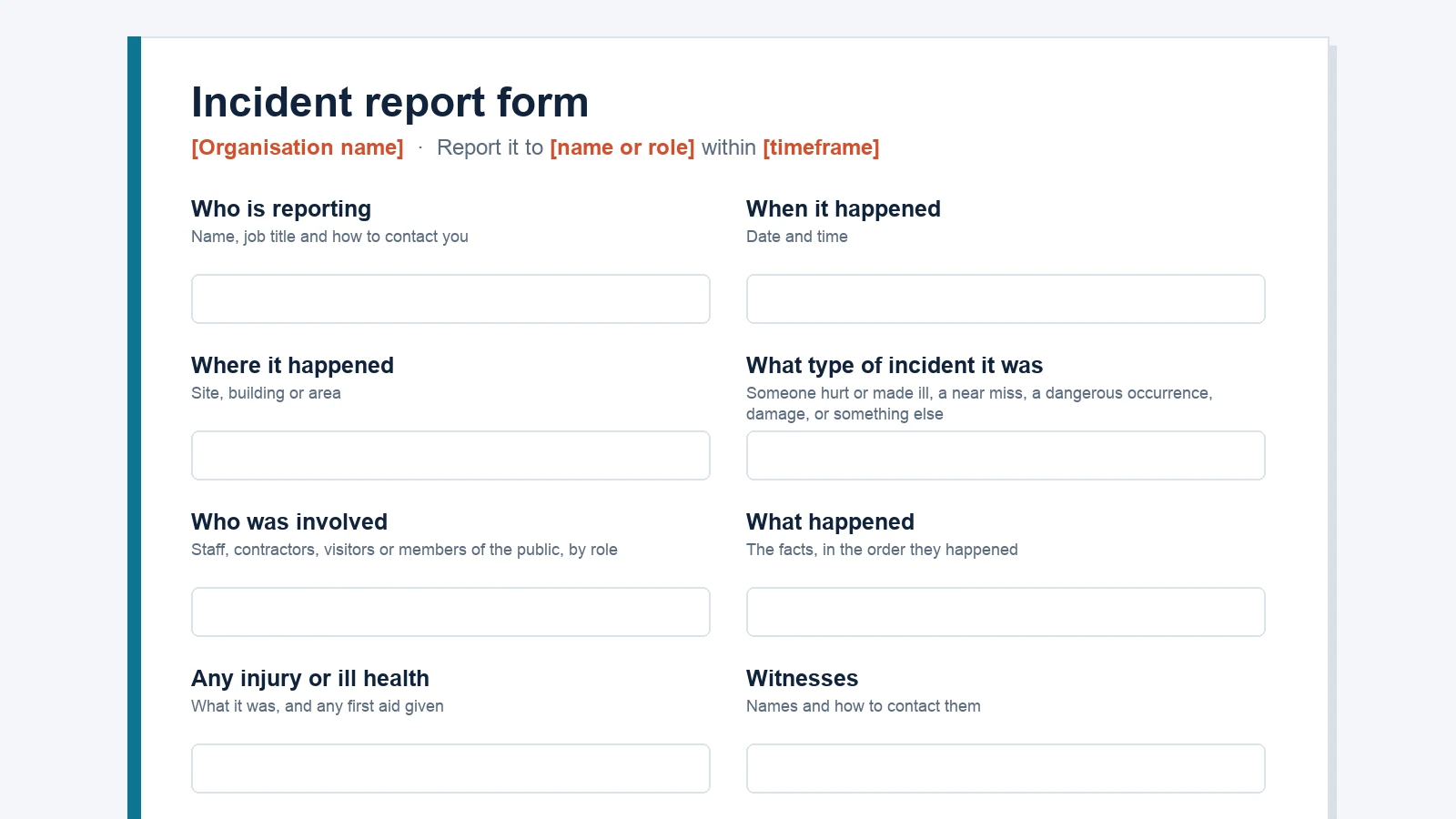
- Incident report form. Word: the questions to ask when someone reports an incident, with a section for the manager.
- Incident log template. Excel: a row for each incident, from what happened to the actions and the date it closed.
- Setup guide. What to record, things to be aware of, and how to set up the form and log yourself.
You adapt the form and log and set them up yourself, using the guide. No automation or dashboard included.
Your incident reporting, set up for you
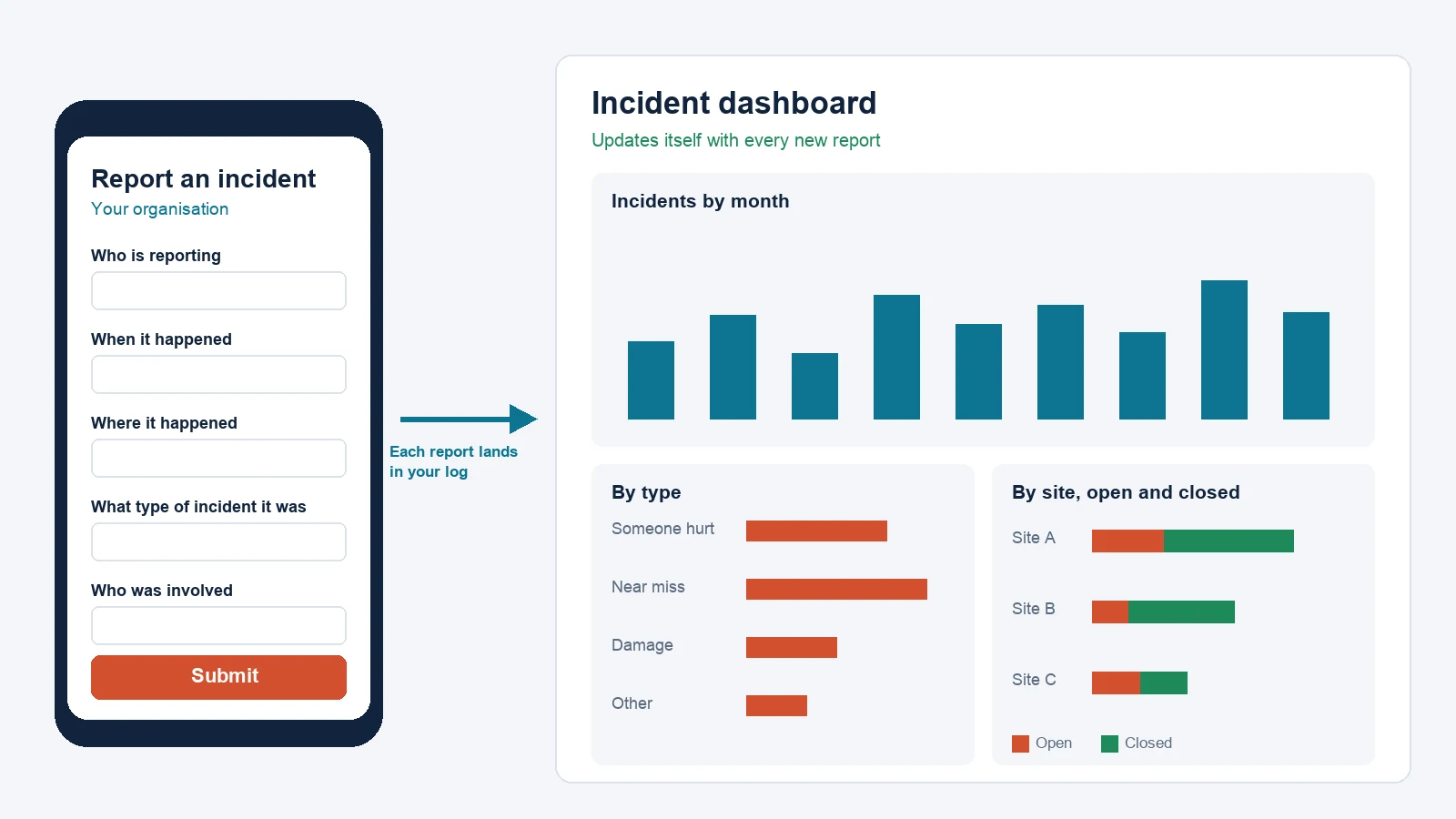
- Your reporting form, built for you. Set up for your sites, your incident types and the people who handle reports, ready for staff to use on any phone or computer.
- Every report in your log by itself. Each report lands in your incident log the moment it’s submitted.
- The right people alerted. The people who handle reports get an email for every new report.
- A dashboard that updates itself. Incidents by month, type and site, and which are open or closed.
Our team will be in touch with follow-up questions to set it up for your organisation.
Request the free templates
Enter your work email and the team will send you the incident report form (Word), the incident log template (Excel) and the setup guide, for you to adapt and set up yourself.
Request received
Thanks. The team will send the templates and the setup guide to your inbox within one working day.
Could not send that request
Something went wrong on our side. Please try again, or use our contact form and we'll get the scoped copy over.
Get it set up for you
Enter your work email and we'll set up your incident reporting for you: your reporting form built for your sites and incident types, ready for staff on any phone or computer, every report landing in your log by itself, the right people emailed for each one, and a dashboard that updates itself. From £399 per company. Our team will then be in touch with follow-up questions to set it up for your organisation.
Request received
Thanks. Our team will be in touch within one working day with follow-up questions to set it up for your organisation.
Could not send that request
Something went wrong on our side. Please try again, or use our contact form and we'll get the scoped copy over.
Setting up your incident log yourself
The free setup guide takes you through these steps:
- Build the form. Copy the questions from the incident report form into Google Forms, or Microsoft Forms if you use Microsoft 365, so staff can report from a phone or computer.
- Link it to your log. In Google Forms, save the responses to a linked Google Sheet, which becomes your log. In Microsoft Forms, open the responses in Excel. Add the columns from the incident log template for the manager’s part.
- Get an email for each report. Both Google Forms and Microsoft Forms can email you when a response comes in. Each person who needs the alerts switches them on.
- Review it every month. Look for incidents that repeat by site, type or time of day, check the actions are done, and update the risk assessments the incidents point to.
The guide also covers the rest of what’s on this page: what to record, how to write it up, and things to be aware of. The full guide comes with the templates.
In health and care services
Health and care providers in England have more to do with an incident than most employers:
- Notify CQC. Registered providers must notify CQC without delay about certain incidents, including the death of someone using the service, serious injuries, abuse or allegations of abuse, and incidents reported to or investigated by the police.
- Record patient safety events. Providers on the full-length NHS Standard Contract, including NHS trusts, record patient safety events on NHS England’s Learn from Patient Safety Events service. Any healthcare provider with an ODS code can use it.
- Be open when things go wrong. A notifiable safety incident triggers the duty of candour: tell the person, apologise, explain what you know and what happens next, then follow up in writing. Our duty of candour guide covers each step.
Providers on the NHS Standard Contract, including independent providers of NHS-funded care, follow the Patient Safety Incident Response Framework when they respond to incidents. Our PSIRF guide explains it.
Or log every incident in one place, free
CompliantCare’s free plan includes a 60-second incident log, free forever. Staff report in seconds from anywhere, anonymously if they choose, and every report lands in one place. When you need more, Incident Management runs each incident end to end, from capture through investigation to action and learning.
Last reviewed: 14 October 2026. General information, not legal advice. We review this guide when HSE or CQC updates its guidance.
Common questions
Is an accident book a legal requirement?
Yes, for many employers. If you normally employ 10 or more people at the same time on or about the same premises, or run a factory, mine or quarry, the Social Security (Claims and Payments) Regulations 1979 require you to keep an accident book, on paper or electronically, and to keep each entry for at least three years. HSE says you can buy its accident book or record the details in your own system. In its book, BI 510, each record tears out so you can store it securely.
What's the difference between an accident, an incident and a near miss?
HSE uses accident when someone is hurt or made ill, and incident for near misses and situations where harm could have happened. A near miss is an event that didn't cause harm but could have caused injury or ill health. Record all of them: near misses show you where to act before someone is hurt.
Which incidents must be reported to HSE?
In Great Britain, RIDDOR covers work-related deaths, specified injuries to workers, injuries that keep a worker off work or their normal duties for more than seven days in a row, some occupational diseases, certain dangerous occurrences, and members of the public taken straight from the scene to hospital for treatment. Most reports go online through HSE's website. Northern Ireland has its own version of RIDDOR, with different deadlines.
How long should we keep incident records?
Keep RIDDOR records and accident book entries for at least three years from the date you made them. Keep other incident records only as long as you need them, and keep them secure, because they hold personal and health details.
Can we use Google Forms for incident reporting?
Yes. A Google Form can save its responses to a linked Google Sheet, which becomes your incident log, and you can switch on an email alert for new responses. Microsoft Forms can open its responses in Excel and email you for each one. The free setup guide walks you through both.
What's in the free templates?
An incident report form for staff to fill in, with a section for the manager; an incident log template with a row for each incident, from what happened to the actions and when it closed; and a setup guide covering what to record, what to report to HSE, and how to set up the form and log yourself.
What's the difference between the free templates and having it set up for you?
The free templates are blank: you adapt the form and log and set them up yourself, using the guide, and they don't include a dashboard. When we set it up for you, we build your reporting form for your sites and incident types, ready for staff on any phone or computer; every report lands in your log by itself; the people who handle reports get an email for each one; and a dashboard updates itself with incidents by month, type and site.
References
- HSE: RIDDOR, reporting of injuries, diseases and dangerous occurrences
- The Reporting of Injuries, Diseases and Dangerous Occurrences Regulations 2013 (SI 2013/1471)
- HSE: RIDDOR, types of reportable incidents
- HSE: Investigating accidents and incidents (HSG245)
- HSE: Report accidents and illness
- The Social Security (Claims and Payments) Regulations 1979, regulation 25
- The Management of Health and Safety at Work Regulations 1999, regulation 3
- ICO: Special category data
- The Care Quality Commission (Registration) Regulations 2009, regulation 16
- CQC: Regulation 18, notification of other incidents
- CQC: What you must do when you discover a notifiable safety incident
- NHS England: Learn from patient safety events (LFPSE) service
- Google: Choose where to save form responses
- Google: View and manage form responses
- Microsoft: Check and share your form results
For general information only. It reflects our understanding of the FCA's rules as of October 2026, so check fca.org.uk for the current rules.