
Anonymous reporting for sexual harassment: start free in Slack or Teams
Give staff a safe way to report sexual harassment, anonymously or by name, in Slack or Microsoft Teams, with no new platform to roll out. Each concern goes straight to the people you choose, so you hear about it while you can still act, and you can show the EHRC or a tribunal what you did. Start free. For businesses with fewer than 500 employees.
Staff report sexual harassment in Slack or Microsoft Teams, anonymously or by name, and each concern goes straight to the people you choose. Start free: your first 10 concerns are free. For businesses with fewer than 500 employees.
| Question | Short answer |
|---|---|
| How staff report | In a private chat with the Safe Workplace app, in Slack or Microsoft Teams. You choose Slack or Teams. |
| Anonymous or named | The person reporting chooses, and stays anonymous while you reply if they want to. |
| Where concerns go | Straight to a private Slack or Teams channel with the people you choose. |
| Setting it up | An admin installs the app and you choose who receives concerns. Our team sets it up with you. |
| New software or training to report | None if your staff already use Slack or Microsoft Teams. The launch and promo material shows them how to report. |
| The law | It helps you meet the reporting step in the EHRC’s guidance, with every concern raised in the app in one log. |
| Cost | Start free: your first 10 concerns are free. |
| What happens next | Enter your email, and we book a 30-minute onboarding call. |
Why staff don’t report sexual harassment
Most people harassed at work never report it formally. In the government’s 2020 survey, 29% of people in work had experienced sexual harassment at work in the previous year, and only 15% of them reported it formally (Government Equalities Office).
Fear and doubt keep people quiet. In 2024, 37% of UK employees who knew about misconduct at work didn’t speak up. Of those, 40% feared for their job and 42% doubted anything would be done (Institute of Business Ethics).
Most people who speak up tell their manager. 68% of people who report misconduct tell their direct manager, and only 14% of reports reach official channels such as HR or compliance (Gartner, 2019).
A safe way to report, in Slack or Teams, means you hear about harassment early, while a conversation can still fix it.
What the law expects of employers
In England, Scotland and Wales
- Reasonable steps. Since 26 October 2024, employers must take reasonable steps to prevent sexual harassment of their staff. On 30 October 2026, that becomes all reasonable steps, and employers must also take all reasonable steps to stop customers, clients, patients and other third parties harassing staff.
- A way to report. The EHRC’s guidance on those steps includes reporting: more than one way to report, named or anonymous, so nobody has to report to the person harassing them, and one confidential log of every concern, formal and informal.
- Sexual harassment and whistleblowing. Since 6 April 2026, reporting sexual harassment can be a protected disclosure under whistleblowing law, which means nobody at work may treat them badly for reporting. Our UK whistleblowing policy guide covers what your policy should say.
- Enforcement. Employment tribunals can’t hear a claim for a breach of the duty on its own, and the EHRC enforces it. When a tribunal upholds a sexual harassment claim and awards compensation, it must consider whether the employer breached the duty, and can add up to 25% to the award. From 30 October 2026, employees can also bring a claim over harassment by a third party.
Our Worker Protection Act guide covers each of the steps, and our sexual harassment training guide has a free training pack for your staff.
In Australia
Under the positive duty, the Australian Human Rights Commission’s standards include reporting and response: more than one way to report, including anonymously, and no need to report internally first. Our positive duty guide covers all seven standards. Work health and safety laws also require employers to manage sexual harassment as a psychosocial hazard, and our psychosocial hazards guide sets out what each state requires.
How anonymous reporting helps you comply
Reporting is one of the EHRC’s eight steps for preventing sexual harassment, and anonymous reporting in Slack or Teams helps you meet it.
- Another way to report, named or anonymous. Staff can report with their name or anonymously, as well as to a manager or HR.
- One log of every concern raised in the app, with your replies to each one.
- A record you can show. When the EHRC or a tribunal asks what you did, the log shows each concern and how you handled it.
Why reporting in Slack or Teams is quick to start
If your staff already work in Slack or Microsoft Teams, they can report from day one, so you start hearing about concerns straight away.
- No new tech to adopt. Staff report in the app they already use, and the people who handle concerns pick them up there, so staff have no new platform to learn.
- No change management. Nothing about how staff work changes. The launch and promo material tells them about the new way to report.
- No training course. The app asks staff a few questions in the chat, and the guide on how to raise a concern shows them how to start.
- Set up with you. It starts with a 30-minute onboarding call about what you need.
How anonymous reporting works in Slack or Teams
- Install the Safe Workplace app in Slack or Teams. An admin installs it once, and our team sets it up with you.
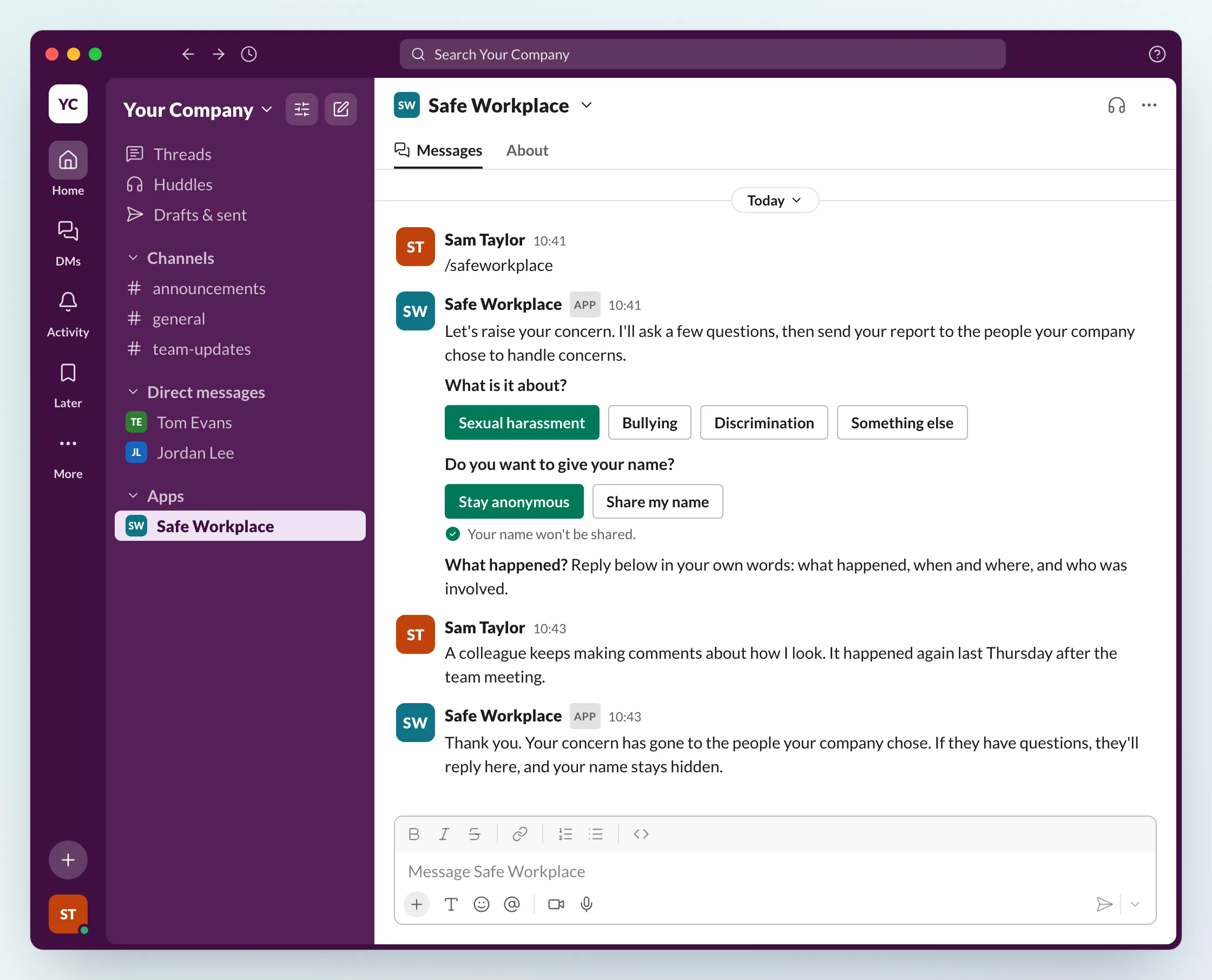
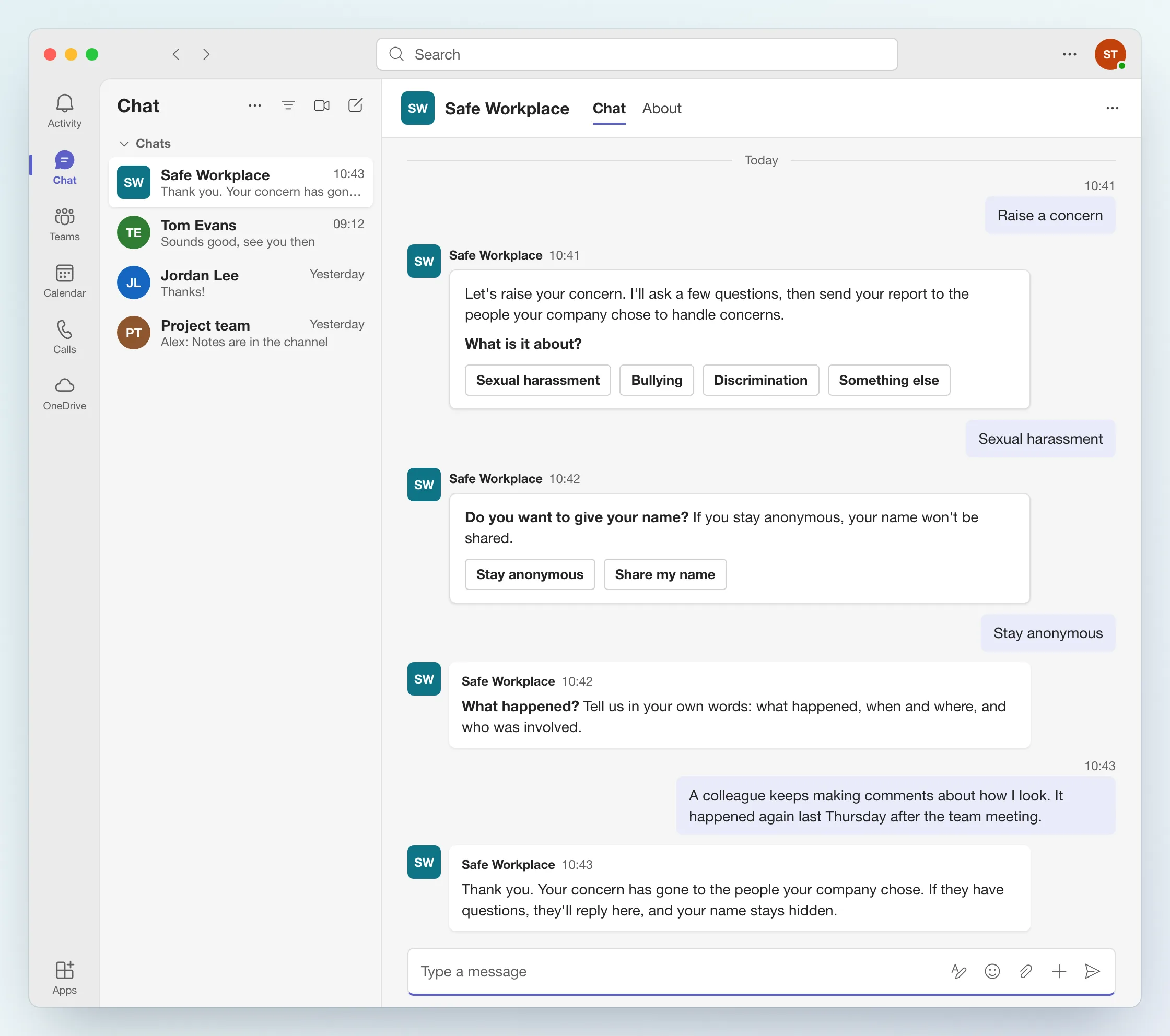
- Staff start a report in Slack or Teams. In Slack, they type /safeworkplace. In Teams, they open a chat with the Safe Workplace app and choose Raise a concern. The app then asks a few questions in a private chat, including whether they want to give their name.
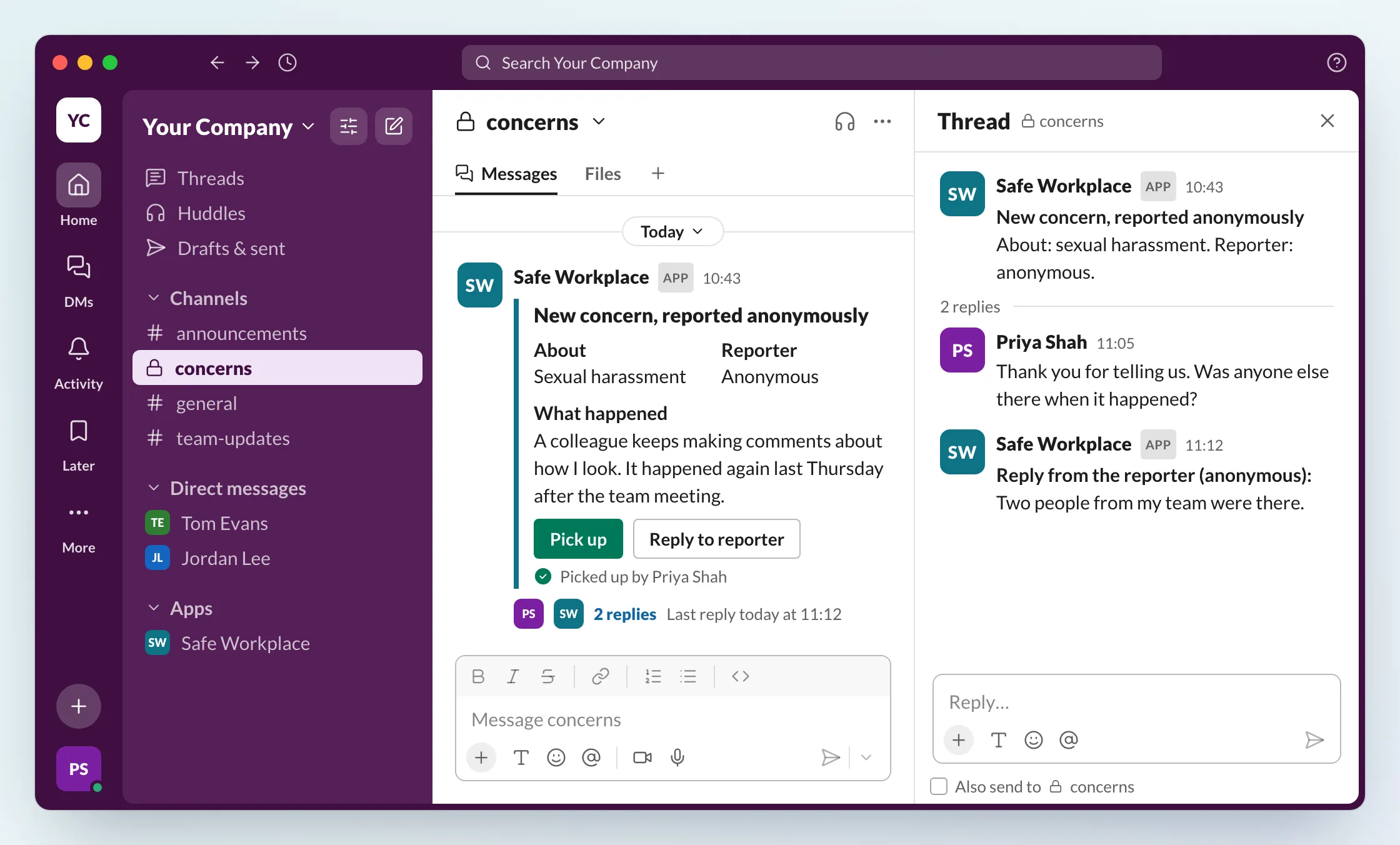
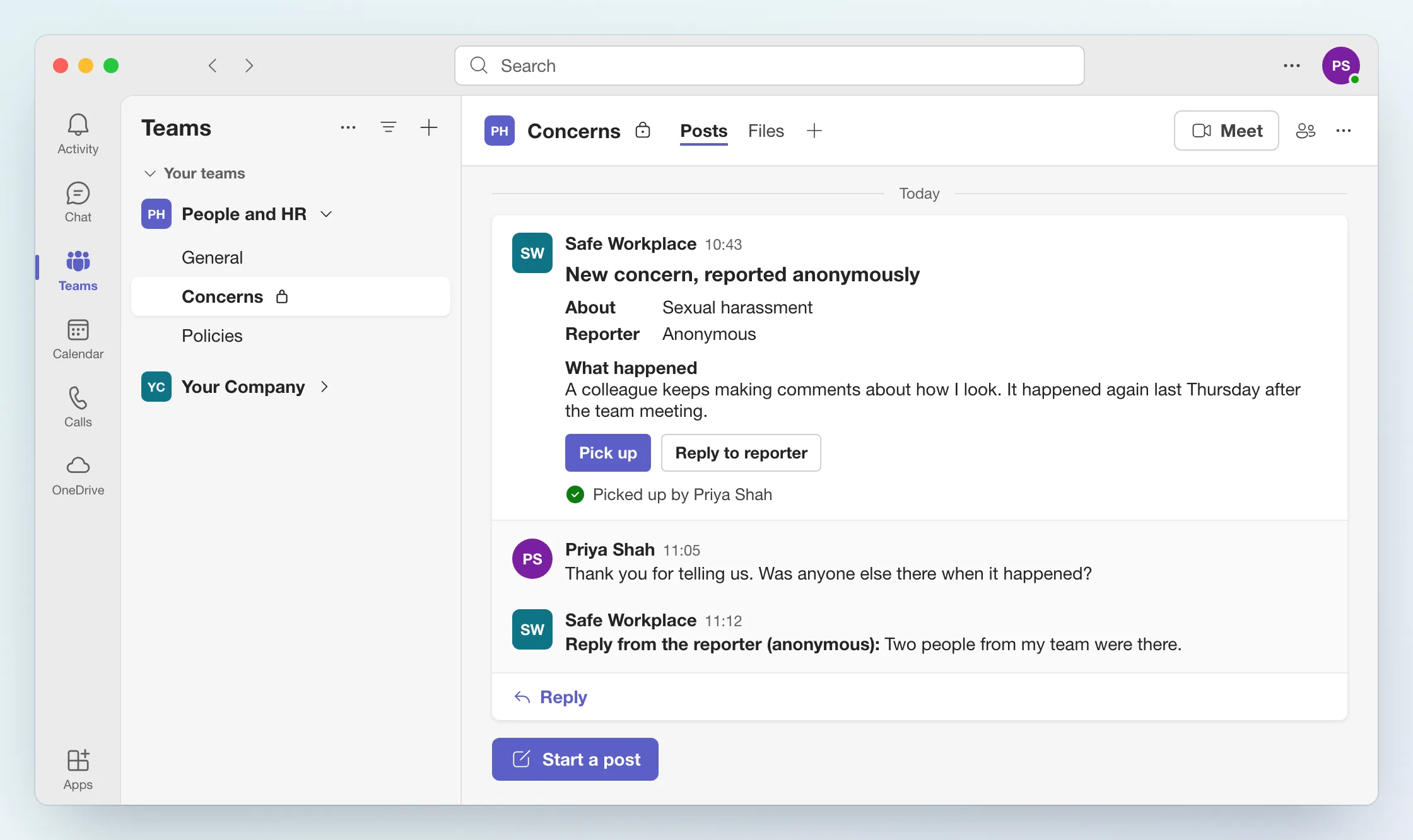
- It goes straight to the people you choose. Each concern arrives in a private channel with only the people who handle concerns, and one of them picks it up.
- You ask questions, and they stay anonymous. The people handling it reply in the concern’s thread, and the app passes each question on. The person who reported answers in their chat with the app, without giving their name unless they choose to.
- Every concern stays in one log. It shows each concern and how you handled it.
How to set up anonymous reporting in Slack
Setup takes three steps, and our team does it with you.
- Install the Safe Workplace app in Slack. A workspace admin approves the install.
- Create a private channel for concerns, such as #concerns, and add only the people who handle them, for example an HR lead and a senior manager.
- Tell your staff. Post the announcement from the launch and promo material in Slack, and share the guide on how to raise a concern.
Staff then type /safeworkplace in Slack to raise a concern, and the app asks them a few questions in a private chat.
How to set up anonymous reporting in Microsoft Teams
Setup takes three steps in Teams too, and our team does it with you.
- Install the Safe Workplace app in Teams. An admin approves it for your organisation.
- Choose where concerns go: a private channel, such as Concerns, with only the people who handle them, for example an HR lead and a senior manager.
- Tell your staff. Post the announcement from the launch and promo material in Teams, and share the guide on how to raise a concern.
Staff then open a chat with the Safe Workplace app in Teams and choose Raise a concern. The app asks them a few questions in the chat.
Safe Workplace speak-up channel in Slack or Teams
- Anonymous and identifiable reporting
- Built-in workflows for harassment and ethics concerns
- Helps you be compliant with the Worker Protection Act
- First 10 concerns free
- Launch and promo material done for you
- New employee onboarding guide
Enter your email to start free
Our team will be in touch within one working day to book your 30-minute onboarding call.
Enquiry received
Thanks. Our team will be in touch within one working day to book your 30-minute onboarding call.
Could not send that request
Something went wrong on our side. Please try again, or use our contact form and our team will be in touch to book your 30-minute onboarding call.
Or show the board how every concern was handled
When you need more than reporting in Slack or Teams, our full platforms take each concern from the first report to its outcome.
Every concern, captured and investigated
Many ways to report, Slack and Teams among them, anonymous, named or escalating-to-named, with optional AI triage, an enforced investigation process and board-ready reporting.
See CalmER →Every incident becomes learning
60-second incident reporting on any device, PSIRF-aligned categories and Duty of Candour prompts, with incidents, policies, audits and risk in one place and CQC readiness built in.
See CompliantCare →Earlier reporting at Amazon and Thiess
Amazon ran Safe Workplace’s case and concern management across its corporate workforce in more than 40 countries, and early-stage reporting tripled within 12 months. 70% of Amazon employees surveyed said they wouldn’t have reported through any previous route.
Thiess, the world’s largest mining services provider, doubled early-stage incident reporting in under a year and improved incident response times by 50%.
Common questions
Can staff report sexual harassment anonymously?
Yes. Staff choose to give their name or stay anonymous. The people who handle concerns can reply and ask questions, and the person who reported stays anonymous unless they choose to say who they are.
Is reporting sexual harassment whistleblowing?
It can be. Since 6 April 2026, reporting sexual harassment can be a protected disclosure under whistleblowing law in England, Scotland and Wales, which means nobody at work may treat them badly for reporting.
How is an anonymous report dealt with at work?
It goes straight to a private Slack or Teams channel, where the people you choose pick it up. They can reply to ask questions, then decide what happens next, such as an informal conversation or an investigation. Every concern stays in one log.
How do you set up anonymous reporting in Slack?
A Slack admin installs the Safe Workplace app, you create a private channel such as #concerns with only the people who handle concerns, and you tell staff about it with the launch and promo material. Staff then type /safeworkplace to report. Our team sets it up with you.
How do you set up anonymous reporting in Microsoft Teams?
A Teams admin installs the Safe Workplace app, you choose a private channel with only the people who handle concerns, and you tell staff about it with the launch and promo material. Staff then open a chat with the app to report. Our team sets it up with you.
Do staff need new software or training to report?
Not if they already use Slack or Microsoft Teams. They report there, and the people who handle concerns pick them up in a private channel. The launch and promo material includes a one-page guide that shows staff how to raise a concern.
Do we need both Slack and Teams?
No. You choose Slack or Teams.
What does the law expect from employers on reporting?
In England, Scotland and Wales, employers must take reasonable steps to prevent sexual harassment of their staff, and from 30 October 2026 all reasonable steps. The EHRC's guidance on those steps includes reporting: more than one way to report, named or anonymous, so nobody has to report to the person harassing them.
Does anonymous reporting help us comply with the law?
It helps you meet the reporting step, one of the EHRC's eight steps (the others include a policy, a risk assessment and training). Staff can report with their name or anonymously, and every concern raised in the app stays in one log. If the regulator or a tribunal asks what you did, the log shows each concern and how you handled it.
What does it cost?
You can start free: your first 10 concerns are free. On the onboarding call we talk through what you need and the cost after that.
Who is it for?
Businesses with fewer than 500 employees.
What happens after I enter my email?
Our team gets in touch within one working day to book a 30-minute onboarding call about what you need. You get launch and promo material, done for you: an announcement for your staff, a guide on how to raise a concern, a note for managers and a staff FAQ on anonymity, plus a new employee onboarding guide.
References
- Government Equalities Office: 2020 Sexual Harassment Survey (July 2021)
- Institute of Business Ethics: Ethics at Work 2024, UK results (archived)
- Gartner press release on workplace misconduct reporting (12 March 2019, archived)
- EHRC: Employer 8-step guide to preventing sexual harassment at work
- EHRC: Sexual harassment and harassment at work, technical guidance (updated 26 September 2024)
- Worker Protection (Amendment of Equality Act 2010) Act 2023
- Employment Rights Act 2025, section 20: all reasonable steps
- Employment Rights Act 2025, section 21: harassment by third parties
- Employment Rights Act 2025, section 23: whistleblowing on sexual harassment
- Employment Rights Act 2025 commencement regulations (SI 2026/323)
- Employment Rights Act 2025 commencement regulations (SI 2026/1065)
- Australian Human Rights Commission: Guidelines for Complying with the Positive Duty (August 2023)
General information, not legal advice. It reflects our understanding of the law and of EHRC and Acas guidance as of October 2026, so check legislation.gov.uk and equalityhumanrights.com for the current position.